


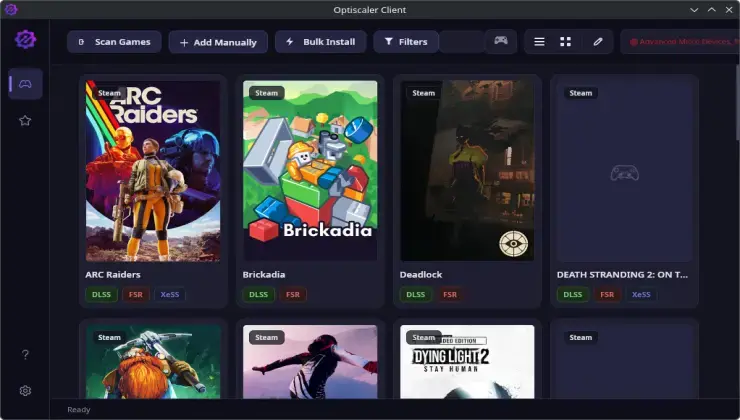
The development team behind OptiScaler Client has released version 1.0.6, marking a significant milestone for PC gamers who rely on upscaling technologies to enhance their gaming experience. This latest update introduces several highly anticipated features, including native support for the Heroic Games Launcher, experimental gamepad functionality, and critically, AMD FSR 4.1.1 compatibility for older graphics processing units. The OptiScaler Client serves as a comprehensive desktop utility designed to streamline the installation, management, and updating of the OptiScaler mod, which has become an essential tool for gamers seeking to maximize visual fidelity while maintaining smooth frame rates.
The addition of Heroic Games Launcher support represents a major step forward for Linux and cross-platform gamers. Heroic Games Launcher is an open-source alternative to the Epic Games Store launcher and GOG Galaxy, popular among users who prefer lightweight, community-driven software solutions. By integrating with Heroic, OptiScaler Client now extends its reach to a broader audience of PC enthusiasts who have migrated away from proprietary launcher platforms. This integration allows users to apply upscaling modifications seamlessly to games purchased through Epic Games Store and GOG without requiring additional configuration steps or workarounds.
Understanding OptiScaler and Modern Upscaling Technology
OptiScaler has emerged as a powerful middleware solution that bridges the gap between various upscaling technologies available in the market today. The mod enables gamers to swap between different upscaling implementations, including NVIDIA DLSS, AMD FSR, and Intel XeSS, regardless of their hardware configuration. This flexibility is particularly valuable for users with older or non-native hardware who would otherwise be locked out of certain upscaling features. The technology works by intercepting graphics calls and redirecting them through alternative upscaling algorithms, effectively democratizing access to premium visual enhancement features.
The history of upscaling technology in gaming traces back to simple bilinear and bicubic interpolation methods, but the landscape changed dramatically with NVIDIA’s introduction of DLSS (Deep Learning Super Sampling) in 2018. This AI-driven approach utilized dedicated Tensor cores found in RTX graphics cards to reconstruct high-resolution images from lower-resolution inputs. AMD responded with FSR (FidelityFX Super Resolution), which took a different approach by using spatial upscaling algorithms that could run on virtually any GPU. Intel joined the competition with XeSS, offering both hardware-accelerated and software-based implementations. OptiScaler emerged from this fragmented ecosystem as a unifying solution.
FSR 4.1.1 Extends Life of Legacy Graphics Hardware
Perhaps the most significant addition in version 1.0.6 is the inclusion of FSR 4.1.1 support specifically optimized for older graphics processing units. AMD’s latest FSR iteration brings improved image quality and reduced ghosting artifacts compared to previous versions, but official support has historically been limited to more recent GPU architectures. Through OptiScaler Client, users with legacy hardware can now access these advancements, potentially extending the useful lifespan of their existing graphics cards by several years. This development is particularly timely given the current GPU market conditions, where mid-range and budget cards remain expensive relative to historical pricing trends.
The experimental gamepad support introduced in this release addresses a growing demand from users who prefer controller-based navigation over traditional mouse and keyboard input. While still in early development stages, this feature allows gamers to browse through OptiScaler Client’s interface and apply modifications using standard gamepad controls. This is especially relevant for users running PC games on living room setups or those using handheld gaming PCs like the Steam Deck, ASUS ROG Ally, or Lenovo Legion Go, where controller input is the primary interaction method.
Community Response and Future Development
The PC gaming community has responded enthusiastically to the continued development of OptiScaler Client, with many users praising the accessibility improvements and expanded hardware support. Online forums and discussion boards have seen numerous testimonials from gamers who have successfully revived older systems or achieved playable frame rates in demanding titles through the utility’s features. The open development model has also encouraged contributions from community members, accelerating feature implementation and bug fixes. Looking ahead, the development team has indicated plans for additional launcher integrations and further refinement of the gamepad interface based on user feedback during the experimental phase.
Expert Opinion: The continued evolution of tools like OptiScaler Client reflects a broader industry trend toward hardware-agnostic gaming solutions. As upscaling technologies become increasingly sophisticated, middleware utilities that enable cross-platform compatibility will likely become essential components of the PC gaming ecosystem. The support for legacy GPUs is particularly noteworthy, as it directly challenges the planned obsolescence model that has characterized the graphics card industry, potentially influencing how manufacturers approach backward compatibility in future product generations.